Shopify Product Feed: The Complete Guide to Multi-Platform Advertising
Learn how to create and optimize Shopify product feeds for Google Shopping, Meta, TikTok, and other platforms. Complete setup guide with best practices and troubleshooting tips.
Shopify Product Feeds, Explained Without the Jargon
Shopify runs more than 4 million online stores, which makes it the default choice for most direct‑to‑consumer brands. One of the most handy things it does is generate product feeds, but here’s the truth: the built‑in tools are pretty bare‑bones, even if you’re paying for Shopify Plus.
So what’s a product feed?
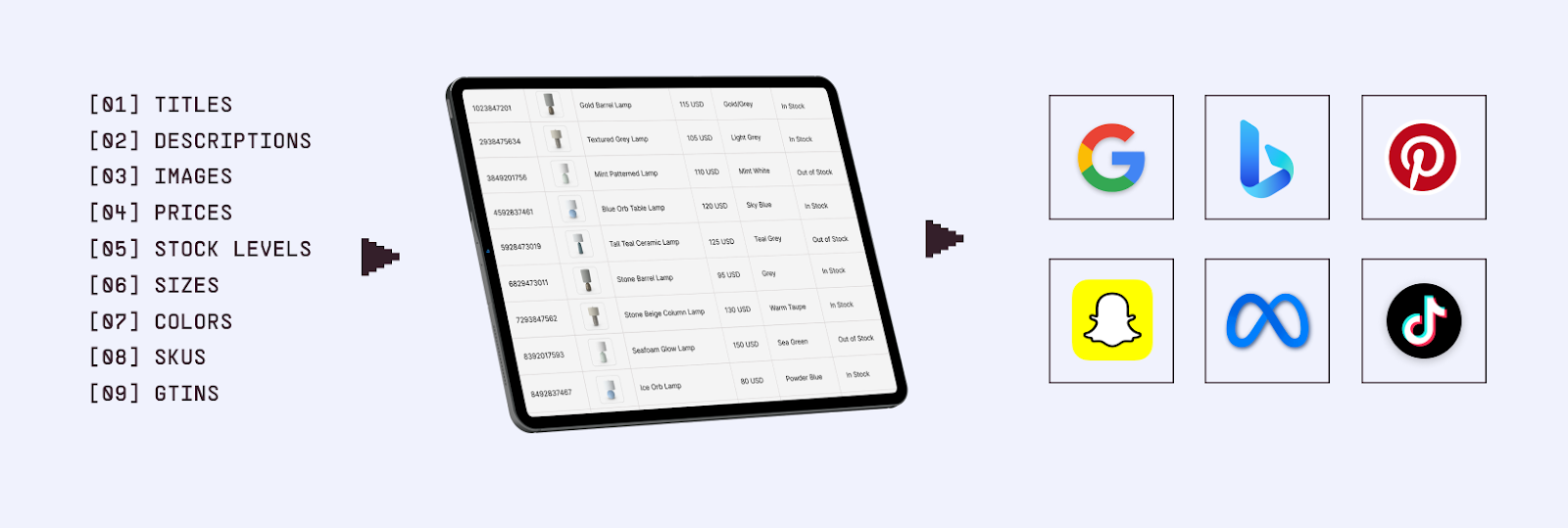
Think of it as a spreadsheet or file that lists out all your products in a way ad platforms can understand. It includes the basics titles, descriptions, images, prices, stock levels, sizes, colors, SKUs, GTINs , basically everything a platform needs to show your products correctly in ads.
That feed is what powers:
Google Shopping Ads
Facebook and Instagram Catalog Ads
TikTok Shopping
Pinterest Shopping Ads
Snapchat Catalog Ads
Bing Shopping Ads
If your feed is messy or incomplete, well, best case scenario: your ads won’t look right. Worst case scenario: they might not even run.
How a product feed powers shopping and catalog ads
How Shopify Handles Feeds
Shopify does have native integrations that automatically sync your catalog with big platforms:
Meta (Facebook + Instagram) → Products flow straight into Meta Commerce Manager.
Google → Your catalog gets pushed into Google Merchant Center.
TikTok → Products sync directly into TikTok’s catalog system.
Sounds easy, right? Just connect and go.
But there’s a catch: these integrations are convenient, not powerful. You don’t get much control over how your data is structured or optimized. And when you’re running serious ad campaigns, that lack of control can hurt performance really bad.
That’s why most experienced advertisers end up using dedicated feed management tools. They give you the flexibility to tweak, optimize, and scale your feeds across multiple platforms, instead of being stuck with Shopify’s “good enough” defaults.
The Problem with Shopify's Native Feed Management
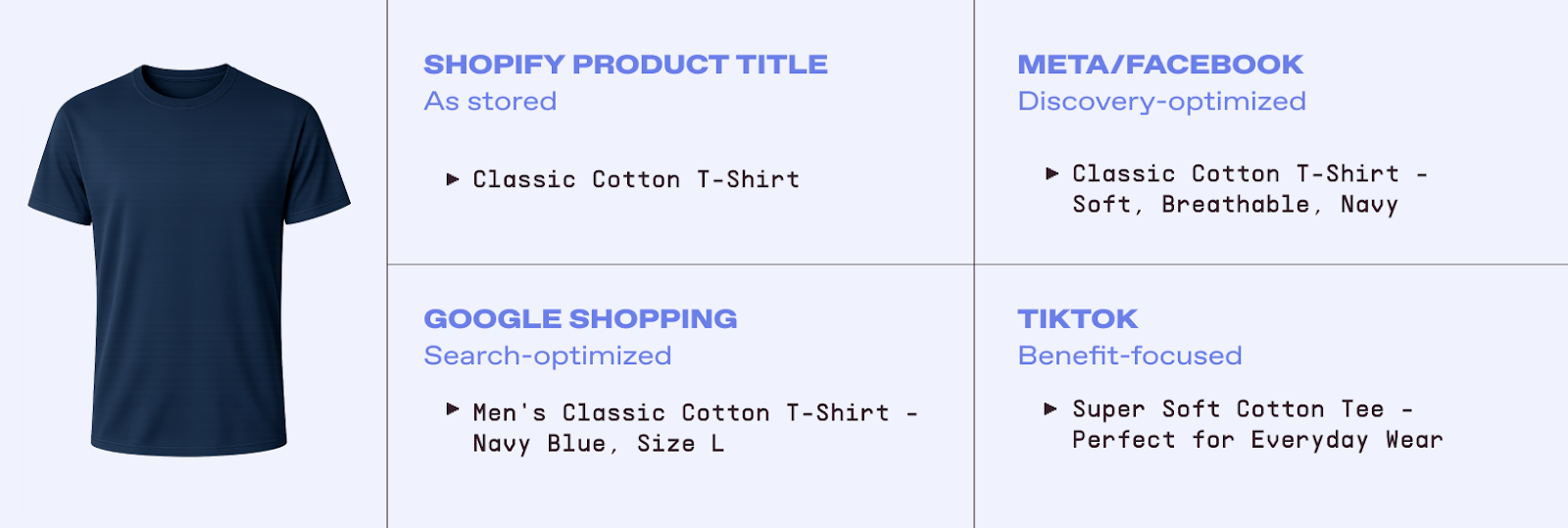
Shopify's built-in feed tools work for basic catalog advertising, but they fall short for brands serious about optimization. Native organization relies solely on Collections, product tags, and product type, missing custom labels, flexible product sets, and performance-based categorization. Feed customization is restricted with fixed formatting and no ability to optimize titles differently for Google (search-focused) vs. Meta (discovery-focused). The same feed data goes to all platforms, preventing platform-specific optimization. Additionally, native integrations lack comprehensive feed-level performance analysis and automated quality checks.
How to Create and Optimize a Shopify Product Feed
Option 1: Use Shopify's Native Integrations (Basic)
Best for small or simple catalogs. Install the Google & YouTube, Facebook & Instagram, or TikTok sales channels, connect the corresponding business account, choose products or collections to sync, and let Shopify push products automatically. This is quick to start but inherits the native limitations (all the ones we just discussed: minimal optimization, shared data across platforms, limited control).
Option 2: Use Shopify Product Feed Apps
Feed apps in the Shopify App Store (e.g., AdNabu, Simprosys, DataFeedWatch, Flexify) add better mapping, custom labels, advanced filtering, and multi-channel support. They also help with error detection and multiple feed versions. Pick based on channels supported, rule sophistication, and catalog size; pricing ranges from free tiers for small stores to enterprise plans.
Setup Process (General):
Install app from Shopify App Store
Authorize access to your store data
Create feeds for target platforms
Configure field mapping and optimization rules
Set up custom labels and categories
Generate feeds
Connect feeds to advertising platforms
Option 3: Use a Feed Management Platform (Sweet Spot for Multi-Platform Advertising)
For brands that are advertising across many platforms, a dedicated feed management platforms offer huge flexibility:
You don’t see the most successful Shopify stores advertising on only one platform. If you are one of them, you're likely running ads across:
Google Shopping (highest intent traffic)
Meta (Facebook/Instagram : massive reach)
TikTok (rapidly growing, younger demographics)
Pinterest (high:intent visual discovery)
Snapchat (younger, trend-conscious audience)
Each platform has different requirements, optimization strategies, and feed formats. Managing this complexity is challenging with Shopify's native tools alone.
The Multi-Platform Feed Strategy
Smart Shopify brands use this approach:
Centralize product data in one feed management system
Organize and enrich products with custom labels, categories, and optimizations
Generate platform-specific feeds automatically with the right formatting
Deploy to all platforms from one dashboard
Track performance across platforms to optimize spend
This approach saves time, reduces errors, and improves performance by allowing platform-specific optimization without managing separate feeds manually.
Marpipe's feed management platform makes this seamless for Shopify stores:and it's 100% free. Connect your Shopify store just once. Organize your products (do not forget the custom labels), generate optimized feeds for Google, Meta, TikTok, Pinterest, and any other platforms you want.
Beyond Feed Management: Enriched Catalog Ads
Having an optimized product feed is essential, but how your products appear in ads matters just as much. Most Shopify stores run "raw" catalog ads: plain product photos on white backgrounds with auto-generated copy.
The Problem with Raw Catalog Ads
Raw catalog ads:
Look generic and boring
Don't reflect your brand identity
Blend in with every competitor
Underperform their potential
The Power of Enriched Catalog Ads
Enriched catalog ads transform your product feed into branded, beautiful advertisements:
Branded backgrounds and design elements
Dynamic text overlays (prices, discounts, product names)
Seasonal and promotional variations
Consistent brand expression across all SKUs
The magic? Create one template, and it automatically generates thousands of unique ads, one for each product in your feed.
Marpipe's Enriched Catalogs give Shopify stores complete creative control over their catalog advertising. Brands using enriched catalogs see an average 53% increase in ROAS compared to raw catalog ads.
Shopify gives you an incredible platform for running your e-commerce business. But to maximize advertising performance across Google, Meta, TikTok, and other platforms, you need more than Shopify's basic feed tools.
Marpipe helps Shopify brands take control of their entire catalog advertising strategy:
Connect your Shopify store and sync products automatically
Organize your catalog with our 100% free feed management platform
Generate optimized feeds for Google, Meta, TikTok, Pinterest, and more
Create enriched catalog ads that outperform generic product listings by 53%
Scale across platforms without managing separate feeds manually
Is the Shopify‑to‑Meta integration good enough for Facebook catalog ads?
It’ll get your products into Meta Commerce Manager, so yes, you can run basic catalog ads. But if you’re serious about scaling? It’s not enough. You can’t add custom labels, you can’t tweak data for Meta specifically, and you’re stuck with whatever Shopify spits out. That’s fine for testing, but once you’re spending real money, you’ll want a feed tool that gives you control.
How do I access my Shopify product feed?
Shopify automatically creates a super simple feed at:
https://yourstore.myshopify.com/products.xml
That’s the “starter pack.” It works, but it’s not optimized for ads. If you want feeds that actually perform, grab a feed app or a management platform. They’ll take your Shopify data and shape it into the format Google, Meta, TikTok, and others expect, so your ads don’t get flagged or underperform.
Can I use the same Shopify feed for Google Shopping and Facebook?
Technically, yes. Both platforms can read the same file format. But here’s the thing: Google and Meta don’t play by the same rules. Google cares about search intent and keywords; Meta cares about discovery and visuals. If you just blast one identical feed everywhere, you’re leaving money on the table. The smarter move is to let a feed tool tailor your data for each platform automatically.
How often should my Shopify product feed update?
At least once a day. That keeps your prices and inventory accurate enough for most stores. But if you’ve got fast‑moving products or you’re running promos, every few hours is better. The gold standard? Real‑time sync. That way, your ads always match what’s actually in stock. Nothing kills performance faster than advertising something that’s sold out.
Do I need Shopify Plus for advanced product feed management?
Nope. Even Plus stores hit the same walls when it comes to feeds. Third‑party tools work with every Shopify plan and unlock features Shopify doesn’t give you, like custom labels, advanced optimization, and multi‑platform control. So don’t think you need to pay for Plus just to get serious feed management.
Boost ad performance in days with a 7 day free trial.











.png)


.jpg)